ISSUE:
We are unable to change the time. For example: The Customer places the order and then calls us to change the time. The extension that controls the time is BSS COMPANY (DELIVE TIME). When we click to change it, it opens normally, after selecting the new time as soon as we click save it shows an error.
1 exception(s):
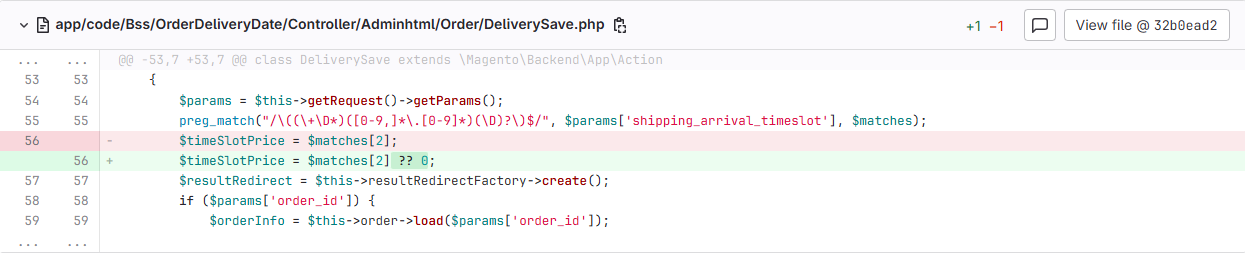
Exception #0 (Exception): Notice: Undefined offset: 2 in /home/774499.cloudwaysapps.com/tjnpvbwhsu/public_html/app/code/Bss/OrderDeliveryDate/Controller/Adminhtml/Order/DeliverySave.php on line 56
THIS IS ALSO HAPPENING WHEN WE TRY TO EDIT THE CUSTOMER'S ORDER OR WHEN WE TRY TO PLACE THE ORDER THROUGH THE ADMINISTRATIVE PANEL.
SOLUTION:
To resolve the issue, please edit the file app/code/Bss/OrderDeliveryDate/Controller/Adminhtml/Order/DeliverySave.php as below:
BSS Commerce is a full-service ecommerce agency with 14+ years of experience, supporting 75,000+ customers worldwide. As an Adobe Commerce Solution Bronze Partner and Select Magento Extensions Builder, we deliver trusted end-to-end solutions.
Our core strength is Magento, with 150+ extensions designed to enhance store performance and drive growth. With deep expertise from years of working on Magento websites, we deliver scalable, high-impact solutions backed by strong client trust.
Looking for more extensions: https://bsscommerce.com/magento-2-extensions.html
You can refer our top tier extensions:
- https://bsscommerce.com/magento-2-b2b-extensions-package.html
- https://bsscommerce.com/magento-2-seo-extension.html
If you need any further assistance, please feel free to contact us. We'd be happy to support you!
Was this article helpful?
That’s Great!
Thank you for your feedback
Sorry! We couldn't be helpful
Thank you for your feedback
Feedback sent
We appreciate your effort and will try to fix the article